★★★★★"Finally got my info off those creepy people search sites. ZeroPrivacy made it easy!"Sarah K.
★★★★★"Tried doing opt-outs myself... what a nightmare. This service saved me hours."Mike P.
★★★★★"Feeling much safer online knowing my data isn't being sold anymore. Highly recommend!"Jessica L.
★★★★★"Found my details on sites I'd never even heard of. ZeroPrivacy removed them all."David R.
★★★★★"Impressed with how quickly ZeroPrivacy handled my removal requests. A+ service."Emily R.
★★★★★"Worth every penny for the peace of mind. So much data was out there!"Alex T.
★★★★★"Finally got my info off those creepy people search sites. ZeroPrivacy made it easy!"Sarah K.
★★★★★"Tried doing opt-outs myself... what a nightmare. This service saved me hours."Mike P.
★★★★★"Feeling much safer online knowing my data isn't being sold anymore. Highly recommend!"Jessica L.
★★★★★"Found my details on sites I'd never even heard of. ZeroPrivacy removed them all."David R.
★★★★★"Impressed with how quickly ZeroPrivacy handled my removal requests. A+ service."Emily R.
★★★★★"Worth every penny for the peace of mind. So much data was out there!"Alex T.

Identity protection starts here

Centeda Opt Out: Remove Your Personal Information

Centeda may publish personal details that make you easier to find. Follow the manual removal guide below, or use ZeroPrivacy to scan data brokers and monitor for records that return.

US Flag+1
Free Scan | No Sign-up Required
By providing your number and requesting a number risk scan below, you agree to receive a one-time message from Zeroprivacy with your scan results. You confirm that the phone number belongs to you, and consent to receive a verification code. Subject to Terms of Service, Prohibited Use Policy, and Privacy Policy.

ZeroPrivacy:

Does not store, sell, or share your personal data
Is SOC 2 compliant and uses end-to-end encryption
Only processes your information to deliver results securely
View our full privacy policy

Disclaimer: You agree not to use any aspect of the ZeroPrivacy Services for FCRA purposes.

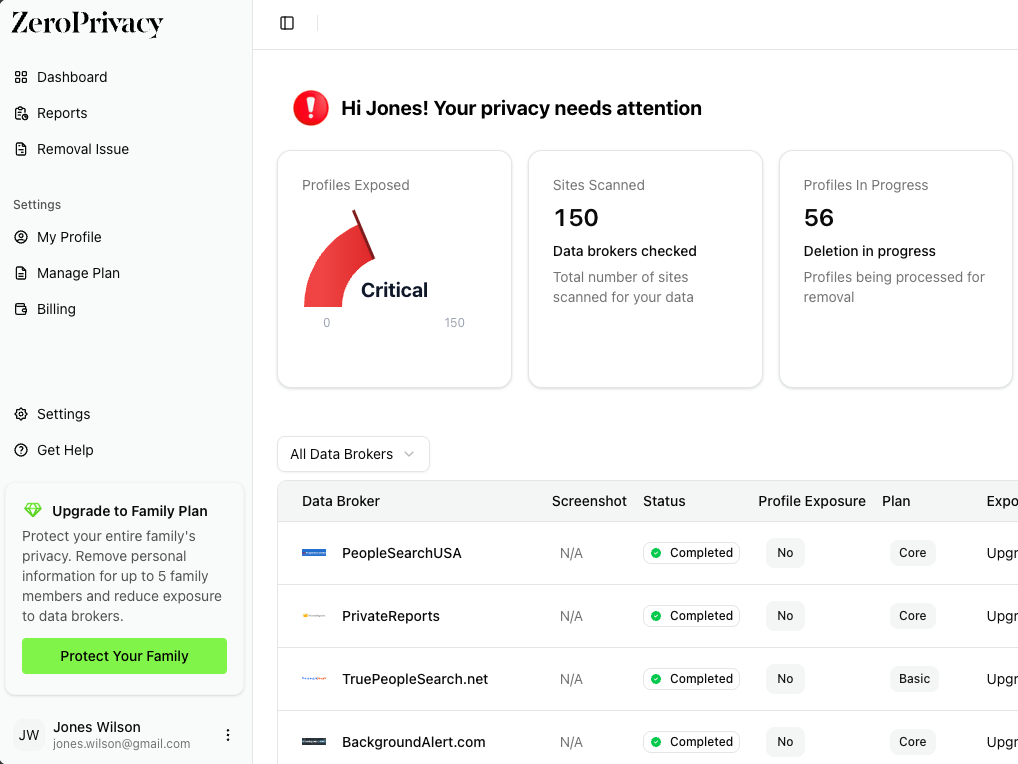
Profile information cards showing data broker exposure like Centeda

Step-by-step privacy guide

How to opt out of Centeda

Centeda removes a specific profile, so finding the exact listing is the important part. Open the matching page, use its Control Profile link, and make sure the profile URL carried into the request is correct.

Time needed
About 8–12 minutes
Cost
Free
Website
Centeda.com
Have ready
Your listing URL and an accessible email address

Step 1

Search Centeda for your name

Use a current or former location to narrow common names.

Open Centeda.com and search your first and last name with a city or state connected to you.

Try a former city or name variation if the first search does not return the record you expect.

Step 2

Open and inspect the matching profile

Confirm the record with several details before requesting removal.

Compare the age, addresses, phone numbers, relatives, employers, or other visible identifiers.

Copy the complete profile URL from the browser address bar and keep the page open.

Step 4

Verify the profile URL in the form

A request tied to the wrong URL can remove the wrong listing or fail.

Compare the form’s Profile URL with the address you copied. Replace it if the value is empty or points to another person.

If you found multiple profiles, submit this request for one URL at a time.

Step 5

Enter your name and confirmation email

Provide only the fields required to process this specific request.

Enter your full name and a working email address. Complete the CAPTCHA before submitting.

Use an inbox you can keep active until the listing is gone.

Step 6

Complete any email confirmation

Some profile-control requests remain pending until the email link is opened.

Check the inbox and spam folder for a message from Centeda. Open the confirmation link if one is sent.

Save the message or confirmation screen with the profile URL and submission date.

Step 7

Reopen the original profile URL

Use the exact saved address to confirm the result.

After the stated processing window has passed, open the original URL in a private browser window.

If the profile is still public, submit the same URL again or contact Centeda with your confirmation details.

Step 8

Remove any second profile

One request usually applies to one profile URL.

Repeat the search with former names and locations and review any additional result carefully.

Submit a separate request for every distinct URL that clearly belongs to you.

Common questions

Is the Centeda opt-out free?

Yes. The manual removal route described here is free. You should not need to buy a report or membership to submit a Centeda opt-out request.

Should I use my primary email address?

Use a separate inbox or alias when the form accepts one, but keep it active until the request is complete. Some brokers require a working email because the confirmation link is the final step.

What if I find more than one matching record?

Treat each distinct profile as a separate record unless the removal page says otherwise. Save every profile URL and submit a request for each listing that clearly belongs to you.

Can the information appear again?

Yes. People-search sites refresh their databases from public records and commercial sources. Keep the confirmation message and check the site again after several weeks.

Does opting out delete the original public records?

No. An opt-out limits display on the broker’s site. It does not erase court, property, licensing, or other records held by the original public agency.